Route Optimization: Cut Miles Without Missing Stops

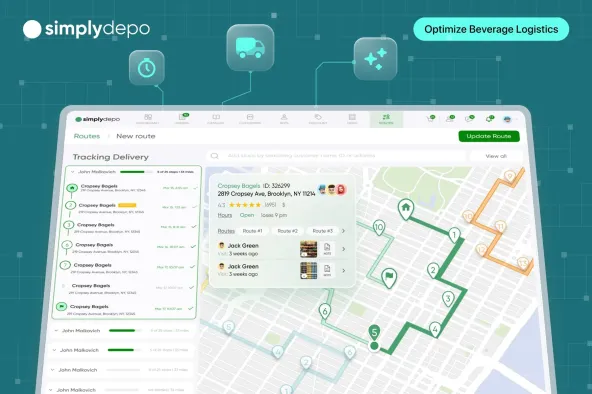
Route optimization helps distributors fit deliveries and sales visits into the working day without wasting miles. The difficult part is building routes that still work when stores have narrow receiving hours or unloading takes longer than expected. A shorter route has little value if your team has to return tomorrow.
For distribution managers, the real goal is lower cost per completed stop while keeping the service customers agreed to. Delivery route management software becomes useful when daily plans need to connect with account details and field activity, rather than live in a separate spreadsheet.
Start with the stops you actually need to complete. Then work out the most efficient way to serve them.

What Route Optimization Actually Optimizes
Route optimization determines how to assign and sequence stops around the limits of your operation. Those limits include how much trucks can carry and when stores will accept deliveries. For field sales teams, the same planning problem includes visit frequency and the time reps need inside each store.
The aim is to minimize travel distance and time while maximizing the number of deliveries or client visits within a given period.
Getting there requires tradeoffs. A route with a few extra miles might avoid an hour of waiting at a loading dock. Another might protect a receiving appointment that would otherwise force a second trip. Compare routes against the job they need to finish.
Google’s explanation of vehicle routing makes the distinction clear. Routing problems can include capacity limits and customer time windows, rather than simply finding the shortest path between locations.
Navigation comes after those decisions. It gives drivers directions along roads. Optimization works out which stops belong together and in what order they should happen.
The Cost of Poor Route Planning
The most expensive routing problems often begin before anyone starts driving. Accounts have incomplete receiving instructions. Every stop gets the same service-time allowance. Yesterday’s route gets reused even though today’s orders won’t fit on the truck.
Those shortcuts create work that doesn’t appear in a mileage estimate. Drivers wait outside stores, then rush later stops. Dispatchers make calls to rearrange arrivals. Reps skip accounts because their schedules allowed time to drive there but not enough time to do the visit properly.
Sales visits and deliveries also need different rules. Dropping ten cases at a familiar store isn’t the same job as checking a promotion and discussing a reorder. Putting both on a map with identical stop durations makes the schedule look better than the working day will be.
Fix the assumptions before judging the route. Otherwise, software simply sequences an unrealistic plan more neatly.
Build Routes Around the Work at Each Stop
Start With Accurate Stops and Service Times
Keep the delivery entrance separate from a store’s public address when they’re different. Record receiving hours against the account. Ask drivers which locations require appointments or regularly involve a wait.
Use actual visit duration where you have it. Busy grocery accounts need different allowances from quick convenience-store drops. For field sales teams, separate routine reorders from longer merchandising visits.
Clean up the list before planning. Duplicate accounts inflate the workload, while missing orders leave teams making urgent additions after departure. Routing can’t correct an order list nobody has checked.
Set the Limits Before Sequencing Stops
Decide which commitments are fixed. Receiving windows are different from preferences such as serving a neighborhood before lunch. Treating every preference as mandatory can make routes impossible to complete.
For delivery routes, check planned quantities against vehicle capacity. Cases alone don’t tell you whether a truck can carry a load if products differ substantially in weight or volume. Include the return to the depot when calculating the length of the day.
For sales routes, agree on required visit frequency. Nearby accounts shouldn’t get extra visits simply because they’re convenient while more distant accounts fall behind. The service plan determines which stores need attention before geography determines the sequence.
Group Nearby Stops and Check the Whole Day
Once the constraints are clear, group stops by area and test the proposed sequence against receiving windows. Look at travel time alongside time spent inside accounts. A route that fits on the map can still run past the end of a shift.
Give drivers or reps a chance to flag bad assumptions before departure. They know which entrances are difficult and which stores rarely receive on time. Use those corrections to improve the account record so the same problem doesn’t need another conversation next week.
Keep enough room for ordinary variation. Filling every minute assumes stores will be ready exactly when you arrive. Compare planned finish times with actual finish times to see whether schedules are consistently too tight.
Make Route Changes Deliberately
An urgent order shouldn’t automatically displace a promised delivery. Check what adding the stop does to the remaining schedule. If it makes later appointments impossible, arrange another option instead of quietly passing the problem to drivers.
Decide who can approve changes and how the updated plan reaches the field. Managers also need to know which stops were rescheduled, so an unfinished visit doesn’t disappear when tomorrow’s route is built.
Delivery scheduling is closely related to this work. The schedule sets the commitments your team needs to honor. Routing determines how to meet them with the capacity available.
Work Out What Wasted Miles Cost Your Team
Use your own route records to estimate the opportunity. Start with excess miles you can realistically remove while completing the same work, rather than treating every difference from the shortest route as waste.
Say five drivers each avoid ten unnecessary miles on 250 working days. That removes 12,500 miles over a year. At an assumed variable vehicle cost of $0.40 per mile, the example produces $5,000 in avoided vehicle costs.
The rate is an example input, not an industry benchmark. Replace it with your fuel and maintenance figures. Keep driver wages separate if your vehicle rate doesn’t include labor, and avoid adding fuel twice if it’s already in the rate.
Time savings need the same care. Finishing earlier creates cash savings when it reduces paid overtime or another actual expense. If the team uses that time for more visits, measure the additional work completed. Don’t count both outcomes as if the same hour produced each one independently.

How Route Optimization Improves Customer Satisfaction
Customers judge service by what happens at their stores. They notice whether products arrive during receiving hours and whether someone warns them when plans change.
Give arrival commitments that match the route’s real capacity. When delays threaten those commitments, contact the affected accounts early enough for them to adjust. A narrow promise that routinely slips creates more work for store staff than a realistic window.
Record why stops fail. Closed receiving docks call for different fixes from missing stock or incorrect order quantities. Shorter drive times won’t solve every missed delivery, so distinguish routing failures from problems elsewhere in the operation.
For sales visits, reliability includes the work inside stores. Reps need enough time to discuss reorders and complete agreed tasks. Adding visits only helps if accounts still get the attention they need.
Choose a Delivery Route Planner Around Your Daily Constraints
Test a delivery route planner with a recent day’s stops. Include the awkward accounts your team has learned to work around. A clean demonstration using ideal addresses tells you less than a plan built around real receiving restrictions.
Ask the provider to show how changes affect the rest of the day. If your operation requires vehicle-capacity calculations or automatic replanning, check those specific capabilities. A route map alone doesn’t establish that the software supports them. For plans that have to change during the day, our guide to dynamic route optimization covers how live replanning works.
Field adoption deserves equal attention. Drivers need plans they can follow, and sales reps need account context when they arrive. Check how completed visits and exceptions reach managers without another round of manual updates.
Keep the test focused on a few practical checks.
- Can the planner respect your essential stop constraints?
- Can the field team use the resulting plan without rebuilding it?
- Can managers distinguish completed stops from rescheduled work?
- Can you compare planned activity with what actually happened?
A tool that reduces planning time but leaves dispatchers reconstructing the day afterward has only moved the work.
When to Use Dynamic Routing and AI
Dynamic routing means adjusting plans as conditions change. It becomes valuable when order changes or disrupted schedules regularly make the original plan unworkable. Stable rounds might benefit more from better account data and realistic stop durations than from constant replanning.
AI route planning is a more specific software topic. Providers use the term for different capabilities, so ask what inputs the system uses and what decisions it changes. Route optimization doesn’t require every product to use AI, and an AI label doesn’t establish that live traffic or automatic rerouting is included.
Even when a system proposes changes automatically, somebody needs to check their effect on service commitments. Frequent changes can make the day harder to follow if teams don’t understand which plan is current.
Check Results Against the Work You Promised
Start with one territory or a small team. Compare similar working days, including order volume and required stops. A quiet day with fewer deliveries will naturally use less fuel, even if the routing hasn’t improved.
Track miles per completed stop alongside the share of deliveries completed within agreed windows. Review overtime and failed stops as well. For sales teams, compare completed visits with the visit plan so easy nearby accounts don’t conceal missed coverage elsewhere.
Review exceptions with the people doing the routes. If the same locations repeatedly take longer than planned, update their service times. If one territory is consistently overloaded, change the workload rather than expecting another sequencing pass to solve it.
The test is whether the plan makes daily work more dependable at an acceptable cost. Keep improvements that survive a normal busy week.
Connect Route Plans With Daily Field Work
Route optimization produces better results when account information stays close to the plan. Receiving notes lose their value if drivers never see them, and completed visits don’t help managers if they sit in separate messages.
SimplyDepo brings route planning and field activity together with account records. Teams can organize customers by geography or last order date and keep notes and tasks with those accounts. Mobile route updates help managers follow the day’s activity.
For distributors and CPG teams, the fit is the connection between routes and work at each store. Use a demonstration to walk through your own stops and confirm the specific planning requirements your operation needs.
Book a demo to see how SimplyDepo supports your team’s routes and account visits.
Frequently Asked Questions
Route planning sets out the stops and schedule for a journey. Route optimization compares ways to assign and sequence those stops against an objective, such as reducing travel cost while meeting receiving windows. In everyday use, software providers sometimes use the terms together.
Yes, small and stable routes can be planned manually when the constraints are easy to check. The work grows harder as vehicles or time windows multiply. Software becomes useful when comparing alternatives takes too much planning time or changes are difficult to communicate.
No. Waiting time and failed deliveries can outweigh a small reduction in mileage. Compare the cost of completing the required work, including repeat trips, rather than distance alone.
Review routes when the workload or service requirements change. Busy operations might adjust daily, while stable delivery rounds need less frequent rebuilding. Use recurring exceptions as a signal that account data or capacity assumptions need attention.
They share geography, but the work differs. Delivery plans need to account for loads and receiving restrictions, while sales plans need time for account visits and agreed coverage frequency. Define the job at each stop before applying the planning rules.

-
February 28, 2026
-
November 1, 2025
-
 October 25, 2025
